
START DJ'ING WITH ABLETON LIVE!
Nail crowd-lifting drops without pricey gear.
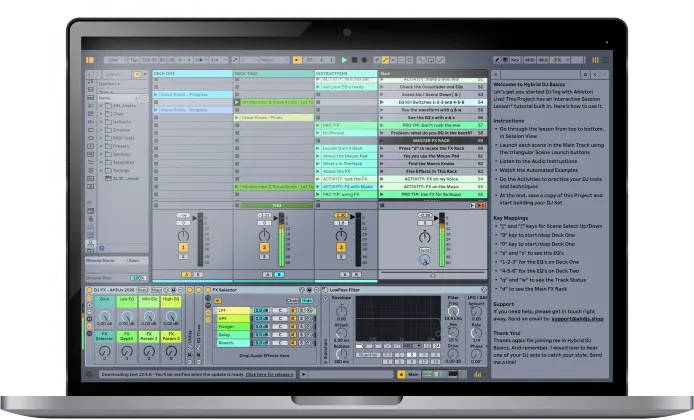
Welcome to Hybrid DJ Basics! Learn how to play a seamless mix set using just your laptop and Ableton Live. This hands-on program combines a downloadable Ableton Template with a built-in guided tutorial, so you learn the fun way... by DOING it. Let's goooo!
Helping Ableton DJ's & Producers since 2018
Join thousands of successful producers and bring your music to life.
Taught by STEVE KNOTS
Ableton CERTIFIED TRAINER

Yes, you can play amazing DJ sets from your laptop
Does this sound like you?
You're super-passionate about music
But you don't own CDJs
No place to practice on DJ gear
Don't have a DJ mixer either
Got tons of secret weapon tracks
You're dying to play live for your people
Just need some help to set it up in Ableton
Play seamless mix sets that take us to another place
Mix tracks in perfect sync
Drop beats that wreck up people's head for like a week after
Tweak FX like a feral wookie boss
Create polished sets you can share online for booking
Expand into Hybrid Live sets with multiple Decks
Sneak your originals into the Set like a white-label vinyl single (only old heads get this)
Actually get kinda unhinged with how much FUN it is
CONTENTS
What You Get In This Program

Ready-to-use DJ Template
Two Decks, EQ's, Crossfader, FX Racks, custom key mappings. Drop your tracks in and go.
a

A Revolutionary Hands-On Tutorial
This Session Lesson® gives you built-in activities that you do inside the Ableton Project, which means you learn by actually mixing music -- no need to keep two windows open for Youtube!

Booth-Tested Techniques
Pro Tips for your Transitions, EQ'ing, FX and building your Crates, from 25-year DJ veteran Steve Knots. This is how to actually mix tracks in a DJ set.

The Process of Warping Tracks
Learn to prep your tracks to make beatmatched mixes with epic Buildups, Peaks and Drops

Organized,Structured Support
You get online lessons with video guides that walk you through every step, from installing the Live Pack to building your Crates inside Ableton.

The Leadership Mindset
As DJ's WE set the vibe and bring people along with us. Beyond DJ skills, this course introduces you to the Leadership Mindset so you can do it too.
TESTIMONIALS
What our students are saying...

"Yooooo Steve! I just finished the instructions on your DJ template and let me tell you it is insane!"
- Fabian Aburto
"This template is amazing... works well with Push2!"
- Mick Docherty
"I really support what you are teaching because I am not trying to be a mainstream DJ lol."
- Izzee Hoffee
HERE's The Revolutionary PART
You Get The Tutorial Inside Live!
Check it out. The tutorial opens up inside Live to give you an interactive learning experience complete with audio Instructions, automated Examples, and hands-on Activities.
This means you learn by DOING IT!
Here's what we do inside.
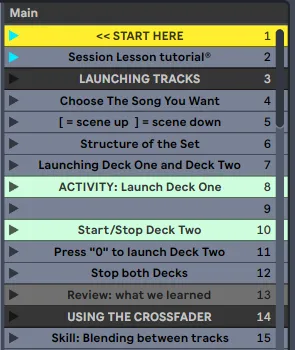
Section 1: Launching Tracks
First you learn the controls to Select, Start and Stop your tracks using HotKeys (not the mouse)
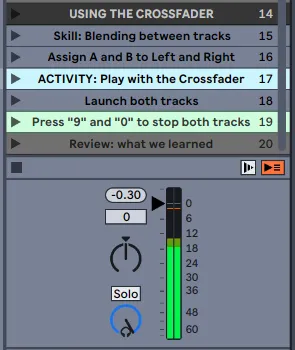
Section 2: The Crossfader
Next you assign the A/B Decks and practice making a seamless blend between two Tracks
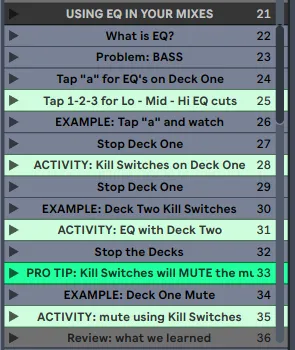
Section 3: Using the EQ's
High-Mid-Low EQ... find out what to do with the EQ's and what NOT to do with them
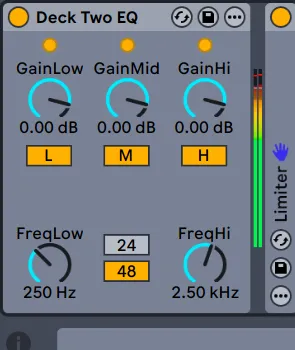
Section 4:Low EQ Cut
Learn how to make buttery smooth Transitions using EQ... without the rookie mistakes
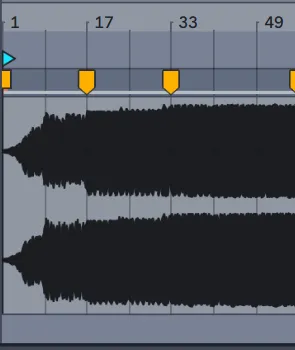
Section 5: Track Timing
Next you check the audio waveform so you always know how long is left on the Track
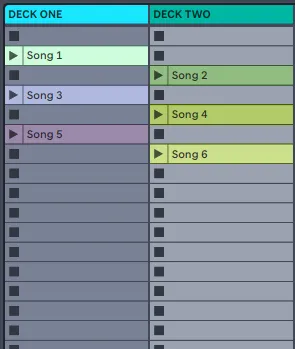
Section 6: Play a Mini-Set
Now put your skills together and practice mixing with some 125bpm House tracks
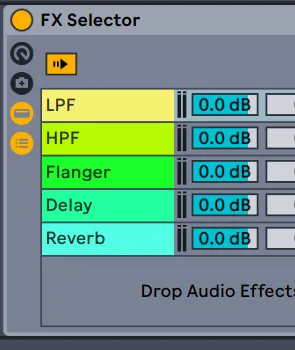
Section 7: Master Channel FX
Finally we add the secret sauce that takes your mix over the top. A little goes a long way!
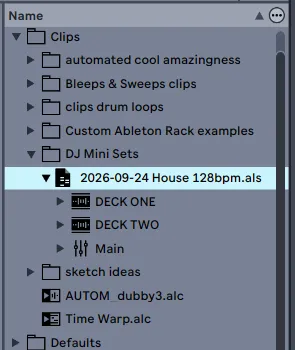
Section 8: Building Your Set
Last we look at how to warp your tracks and prep your Crates so you're ready to play.
This interactive tutorial takes about an Hour. After that, you start building your Set and take off to practice. You could be playing a real mix set by the weekend!
Mix Your First Hybrid Ableton DJ Set
Grab the tracks you love and learn how to play a seamless DJ set from your laptop!
Here's what you get:
DJ Template with Two Decks, FX Racks, custom key mappings
Four House tracks to practice mixing
A Hands-On Session Lesson® tutorial built inside Live (1 Hour)
Online Lessons with Video guides, Pro Tips and Progress Bar to keep you focused
Member's site access for sharing mixes and getting feedback from the Community
Direct Support from Steve Knots by email and text!
Today Just
$97 one time
"You are killing it!"
" Seriously I can't thank you enough. "
ABOUT YOUR INSTRUCTOR
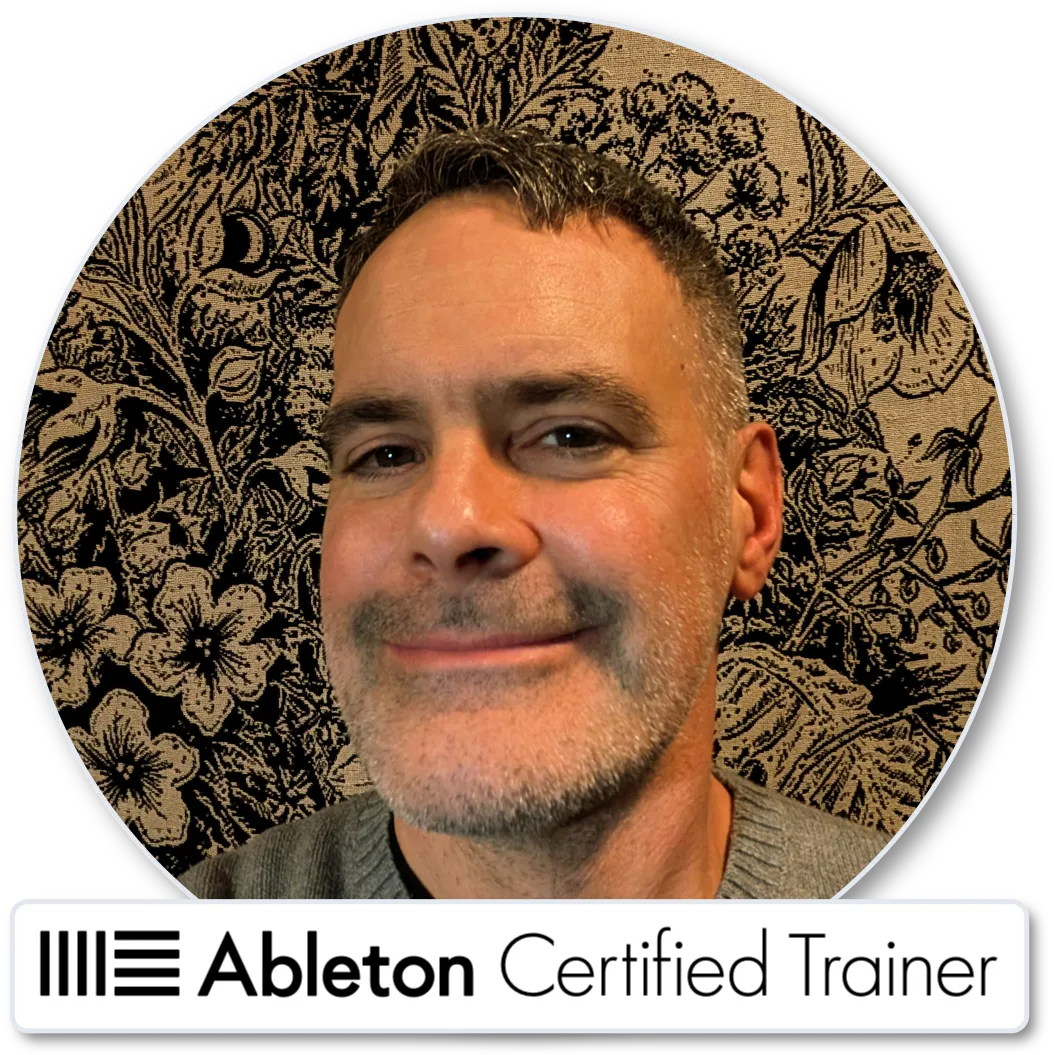
Meet Steve Knots
Veteran DJ since 1999, Steve Knots honed the art of dancefloor leadership with live electronic sets, vinyl sets and Hybrid Ableton sets from NYC to Europe — holding premier residencies at the legendary Cross Club, Palác Akropolis, and Chapeau Rouge (Prague CZ).
Steve cuts past cold mechanics to teach you true musical leadership where you bring the audience on an unforgettable journey in your sets.
And with his unique hands-on tutorials, you LEARN BY DOING IT, instead of watching more videos.
Master the seamless control and intuitive presence needed to read the room, elevate the collective energy, and conduct the crowd from your first beat to the final drop.
Ableton Certified Trainer
Hybrid Ableton DJ since 2006
Inventor of the interactive Session Lesson® tutorial
100+ shows/year from 2009–2014
Reviewed 2500+ songs as mentor with Track Feedback
Co-Founder of Tech25 training center in Pittsburgh
Co-organizer of the Pittsburgh Ableton User Group
B.F.A. from the Sonic Arts Center, NYC 2003
"Great DJ's don't just play tracks... they bring the crowd on a journey to a better place." - Steve Knots
WHO THIS IS FOR...
Whether you're a veteran crate-digger or a raw beginner, Hybrid DJ'ing is your future
Club DJs Who Want More Creative Options
Bedroom Producers
Live Electronic Performers
Twitch Streamers
Ableton Newbies
Non-Traditional DJ's
Soundbath and Bodywork Practitioners
Teenagers Who Won't Shut Up About It
STILL NOT SURE?
Try It Risk-Free For 30 Days
OK, this is Steve talking. I expect you to succeed, and I do everything I can to help make that happen.
Because of that, the return policy is simple and fair:
If you have an issue, ask for help before you ask for a refund.
1. Download the Ableton Live Project and complete the activities inside.
2. If you get stuck, contact [email protected] and ask for help.
3. Follow the recommended advice to get things working.
If you do these three things and still don’t feel it was worth every cent, send me an email and ask for a refund. If it's within 30 days of your purchase, you get your money back. No hard feelings.
STILL GOT QUESTIONS?
Frequently Asked Questions
What kind of computer do I need?
Mac or Windows, desktop or laptop. Not for mobile, iPad or tablet devices. This will work on any computer where you can run Ableton Live. You need Live12 Suite, updated to the newest version (12.4.6 as of this writing). The course contains instructions on how to get the trial version of Live12 Suite for free.
Can I beatmatch and play B2B with other DJ's
Yes, it is possible, but you won't learn it this course. This is just the basics, where you learn how to play a set alone. Playing B2B with another DJ comes in the next course, when we connect twin stereo outs to a DJ mixer and BeatMatch In The Booth.
What makes this course unique?
The unique part is that you do the lessons inside Live. Steve Knots invented the interactive Session Lesson® tutorial on purpose to bring the activities inside Ableton, so you can learn by playing with music, instead of trying to copy something off Youtube. You get all the right sounds, plugins, controller mappings and everything, right there at your fingertips. That means you can close your browser, even disconnect from WiFi, and lock in with the beats. The fun way.
How long does the course take?
The interactive tutorial takes about an hour.
It is split up into bite-sized chunks where you get plenty of playtime and practice time.
The online lessons give you short videos and summaries to help you apply what you learn inside Live.
The whole entire thing will take less than two hours.
How much disk space do the downloads take up on my computer?
Good question. The Live Pack download expands to 514 MB. You can delete the audio files when you’re done, and keep the blank DJ Template by itself… which is only a few MB of space. Not a big deal at all.
What if I am a beginner and never DJ'd before?
That's great, come on in! This course is focused on you, actually. You get simple technical skills to start you off with mixing, plus short videos explaining how to apply every technique that we practice inside Live. You’ll hear all about how DJ’ing is a leadership exercise to bring the crowd with you. You're in the right place.
Why shouldn't I just stick to DJ software like Serato or Traktor?
Because with Ableton Live, you can instantly launch any Track or Loop, without ever having to scroll through a Folder and load a track onto the Deck. It's all right there, ready to play, so you stay in the flow. And yes, you can STILL improvise an impromptu Set with tracks from your Library.
Is this only for electronic music DJs?
Nope! The skills you learn in this course will work anywhere you imagine a seamless blend of audio, whether that’s a meditation class, ambient set, sound bath, ecstatic dance, sonic healing, kitchen disco, kids’ dance class in the gym, or a Top40 wedding mix. It’s all about playing music you love, and you’re the boss.
Can I still improvise and be spontaneous?
Absolutely. Session View lets you build a Set of any size you want, so you have lots of options (just like a big folder on your USB drive with a CDJ). And when you setup your own Custom Folders in the Ableton Browser, like I show you in the course, you’ll be able to drag and drop anything you can imagine, into your set. There’s really no limit.
Doesn't it take forever to Warp tracks and prepare my library?
The truth is, it does take a little time to prepare your music.
But that gives you a massive advantage as a DJ because you will know your tracks better, so you can anticipate the drops and make your mixes at exactly the right moment.
All DJ's have to put in practice time… shopping for records, analyzing tracks and making crates in Rekordbox, etc. You can’t be a great DJ without putting in the work.
And remember — we’re talking about listening to cool music here. I want you to spend as much time as possible doing that!
Enroll in the course now!
Copyright 2026 MIXITECTURE | Session Lesson® | Terms & Conditions | Privacy Policy
This website is not affiliated, associated, authorized, endorsed by, or in any way officially connected with Ableton AG. The official Ableton website can be found at www.ableton.com